Catch ranking decay early
Detect trend shifts before keywords fall out of high-visibility positions and traffic starts compounding downward.
GSC Keyword Tracking
Use one dashboard to monitor rank movement, clicks, CTR, and ranking buckets over time. Your team gets clear signals, clear next actions, and proof of SEO impact in every reporting cycle.
This page shows exactly how GSC keyword tracking turns raw data into fast, conversion-focused decisions.
Detect trend shifts before keywords fall out of high-visibility positions and traffic starts compounding downward.
See where CTR, rank, clicks, and impressions are weakest so teams fix the right pages first.
Use visual proof to show leadership what changed, what was fixed, and how performance improved.
The screenshots below are from the app and mapped to clear business outcomes.
View 1
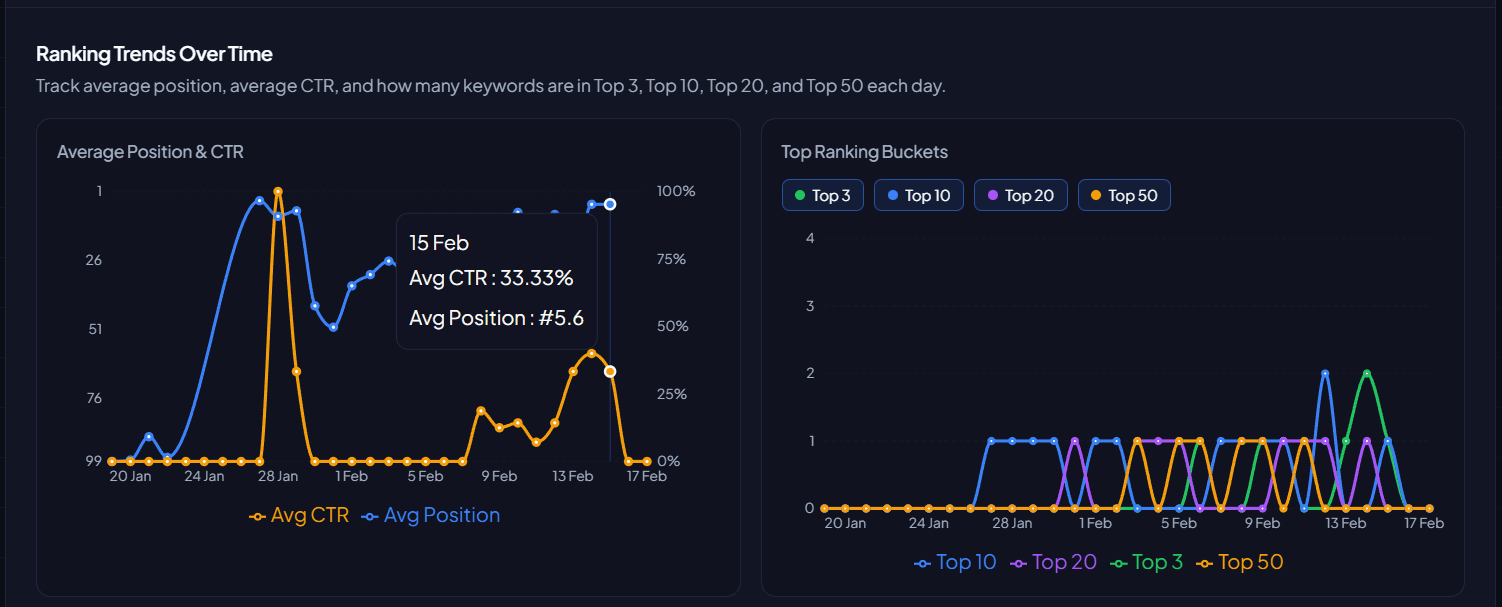
Track trend direction before small volatility turns into sustained loss.
Pain point
Teams often react too late because ranking and CTR changes are buried in exports and disconnected charts.
What this view shows
You get daily trend lines for average position and CTR, plus Top 3, Top 10, Top 20, and Top 50 bucket movement.
Recommended decision
Escalate keywords losing bucket position and assign immediate optimization tasks to protect visibility.
Expected business impact
Earlier intervention, less ranking decay, and stronger stability in organic acquisition.
View 2
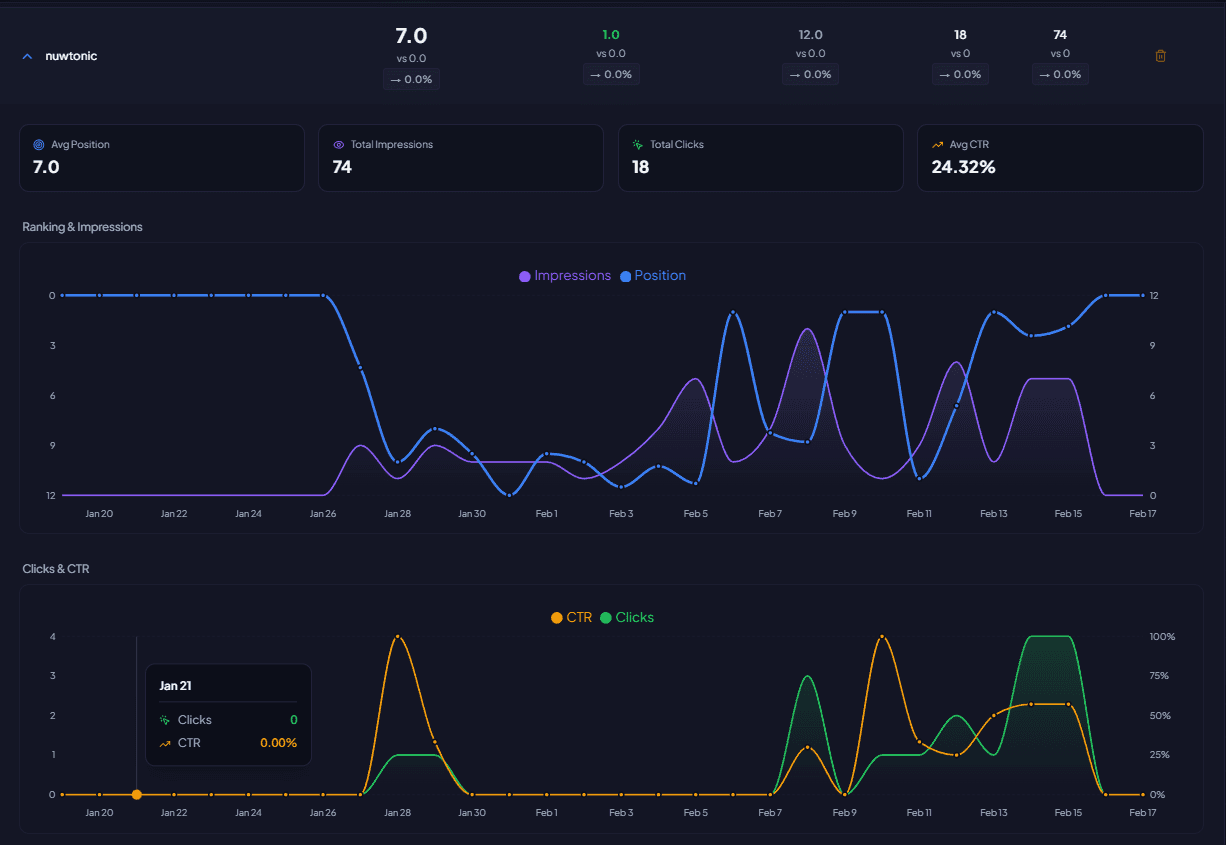
Understand if a keyword issue is ranking, click-through, or demand related.
Pain point
Without detailed context, teams apply generic fixes and waste cycles on the wrong problem.
What this view shows
A single keyword workspace combines position, impressions, clicks, CTR, and historical movement.
Recommended decision
Pick targeted actions: snippet rewrite for CTR leaks, content refresh for rank drops, or intent alignment for weak engagement.
Expected business impact
Faster recovery per keyword and higher conversion quality from qualified search visits.
View 3
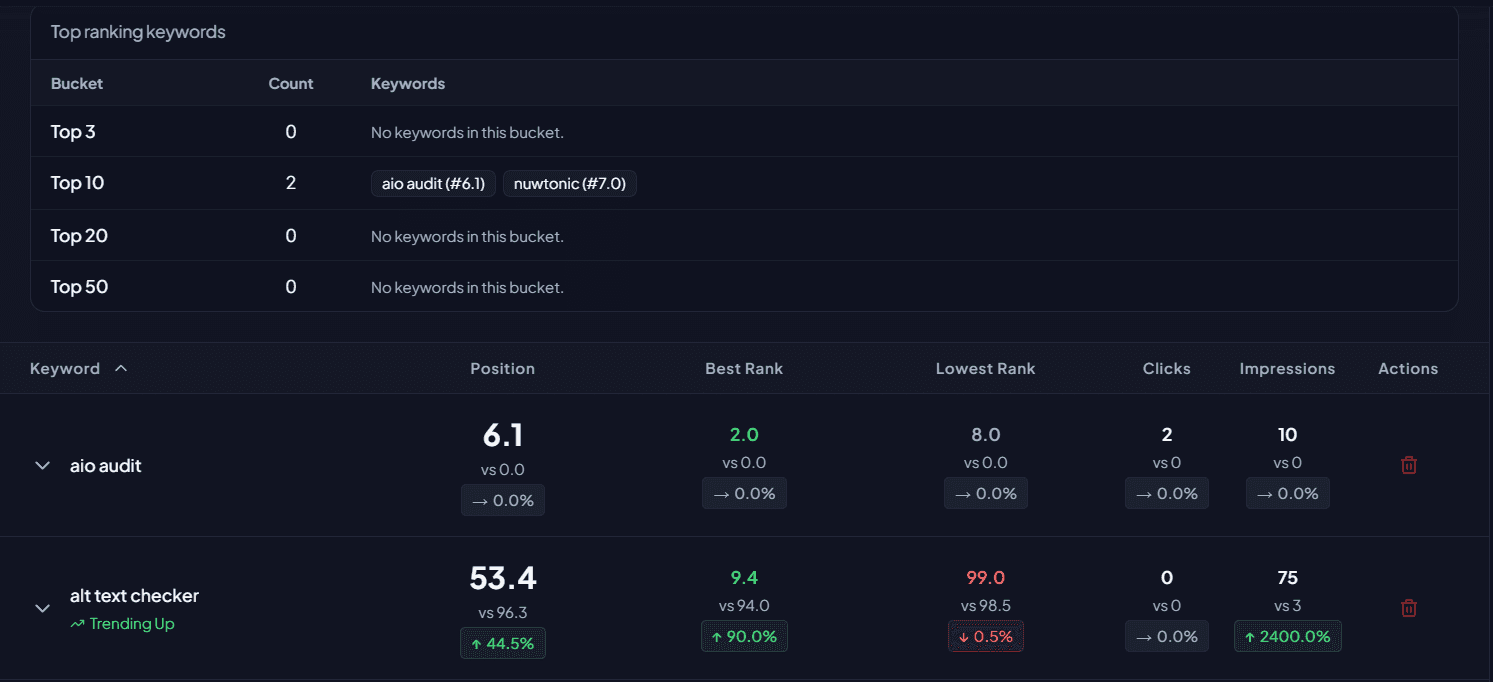
Know exactly which keywords are winning, at risk, or missing from top positions.
Pain point
Teams miss easy wins when they cannot see which keywords sit close to top positions.
What this view shows
Bucket-level breakdown and keyword rows reveal which terms are in Top 3, Top 10, Top 20, and Top 50.
Recommended decision
Prioritize near-win keywords first, then recover declining terms with high impression potential.
Expected business impact
Higher ROI from each sprint and faster movement toward revenue-driving keyword coverage.
Follow this sequence to turn keyword tracking into reliable growth execution.
Review Ranking Trends to detect volatility and bucket losses quickly.
Open the Keyword Detail view for terms with recent decline or weak CTR.
Use the Top Ranking Keywords table to prioritize near-win and high-value recovery targets.
Assign fixes by problem type: snippet, on-page relevance, internal links, or content depth.
Report results with before/after trend evidence to guide the next optimization cycle.
Native reports are useful but fragmented. This feature connects trends, bucket shifts, and keyword-level performance in one workflow so your team can act faster.
Yes. Stable rankings, stronger CTR, and clearer topical relevance improve the signals that often support discoverability and citation likelihood in AI-driven search experiences.
SEO leads, content teams, agencies, and growth managers who need clear proof of what changed and what to fix next.
Use the detail view to validate CTR gaps, then optimize titles, meta descriptions, and intent alignment before changing core content structure.
New to agentic SEO?
Read the definitive guide to agentic SEO and see how every Nuwtonic module fits into one execution loop.
Connect your GSC data, monitor ranking movement in one place, and ship high-impact fixes before performance loss becomes expensive.