Nuwtonic AI SEO Agent Logo
Nuwtonic

Automated 365-Day Cannibalization Tracker

Sitewise Cannibalization Tracker 365*24*7

Cannibalization does not pause when your audit ends—and your tracker should not either. Nuwtonic runs sitewise, always-on monitoring synced to live Google Search Console data 365 days a year, 24 hours a day. The system continuously scans your entire domain, flags when multiple internal URLs compete for the same query, ranks conflicts by click volume, and surfaces the exact pages bleeding traffic—no manual exports, no monthly spreadsheet reviews.

Cannibalization Engine

1. The Invisible Traffic Leak You Are Paying For

The Pain

When multiple URLs rank for the same intent, search engines split link equity, CTR drops, and positions slide. Traditional workflows force you to spot these conflicts manually or export massive spreadsheets every month—often weeks after traffic is already lost.

The Outcome

Continuous 365-day tracking that surfaces intent overlaps automatically, without manual audits or spreadsheet combing.

How Nuwtonic solves it

  • Always-on GSC sync: the engine monitors your full URL footprint year-round, catching new clashes the moment a second page starts earning impressions for the same query.
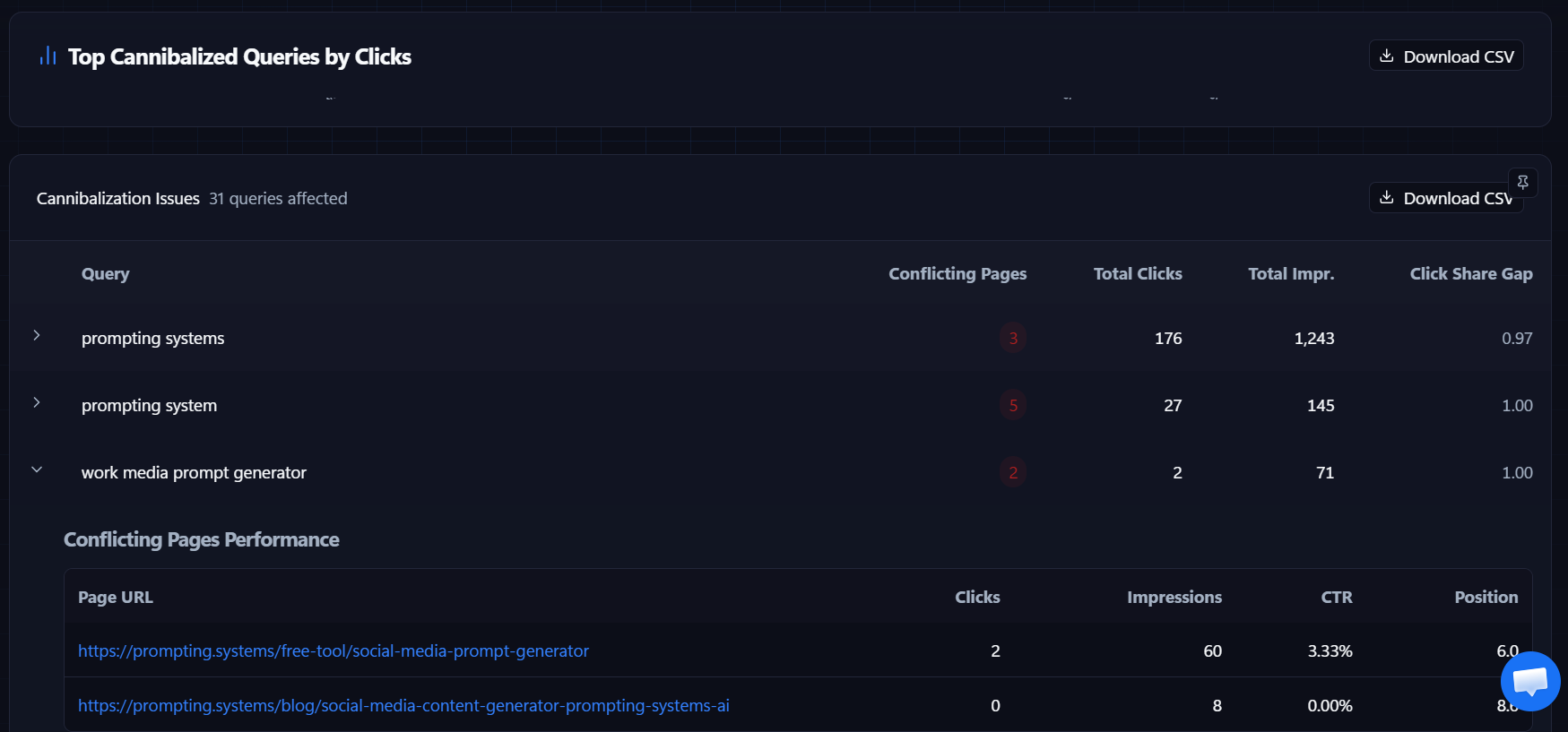
  • Sitewise conflict counter: the dashboard logs exactly how many queries are affected (e.g., 31 queries affected) so you know the scale of the problem at a glance.
  • Priority by click volume: conflicts are ranked by Top Cannibalized Queries by Clicks, so you fix the leaks costing the most traffic first.
Cannibalization Engine

2. Site-Wide Conflict Overview Panel

The Pain

Without a single view of cannibalization across the domain, teams fix one URL at a time while dozens of other queries silently split traffic between competing pages.

The Outcome

A prioritized table showing every conflicting query, how many pages are involved, total clicks, impressions, and the Click Share Gap metric.

How Nuwtonic solves it

  • Query-level conflict map: each row shows the exact search term, a red badge with the number of conflicting pages (e.g., 3 pages for "prompting systems"), plus combined clicks and impressions.
  • Click Share Gap scoring: a 0–1.00 metric reveals how severely traffic is diluted—values near 1.00 mean clicks are spread almost evenly and no single URL owns the intent.
  • Export-ready output: Download CSV lets you share the full conflict list with content, SEO, or dev teams without re-building the analysis manually.
Top Cannibalized Queries by Clicks table showing conflicting pages, click share gap, and expandable URL performance

Cannibalization Engine

3. Competing Pages Deep-Dive Grid

The Pain

Knowing a query is cannibalized is not enough—you need to see which internal URL is winning impressions, which is stealing zero clicks, and what position each page holds.

The Outcome

Expand any query to expose the Conflicting Pages Performance grid with side-by-side URL metrics.

How Nuwtonic solves it

  • URL-level breakdown: expand a row like "work media prompt generator" to reveal every competing internal link with individual clicks, impressions, CTR, and average position.
  • Instant winner/loser read: compare pages at a glance—one URL may hold 60 impressions and 3.33% CTR at position 6.0 while a blog post on the same query gets 0 clicks at position 8.0.
  • Action-ready diagnostics: the split view tells you whether to consolidate, redirect, differentiate intent, or retire the weaker page—without guessing from aggregate site metrics.

Frequently Asked Questions

How is this different from a one-time cannibalization audit?

Most audits are static snapshots. Nuwtonic syncs with live GSC data 365 days a year, so new conflicts are flagged as soon as a second URL starts earning impressions for the same query—before weeks of traffic bleed accumulate.

What is Click Share Gap and why does it matter?

Click Share Gap measures how evenly clicks are distributed across conflicting URLs for a single query. A gap near 1.00 means traffic is heavily split; a lower gap means one page dominates. It helps you prioritize which conflicts are actively hurting performance.

Can I export the conflict data for my team?

Yes. Both the site-wide overview and individual conflict panels include Download CSV, so you can hand off query lists, URL comparisons, and click-share metrics without rebuilding reports manually.

Stop Your Pages From Fighting Each Other.

Connect Google Search Console and let Nuwtonic surface every internal keyword conflict sitewise—ranked by click impact, expandable to URL-level diagnostics, ready to export and fix.