Key Takeaways
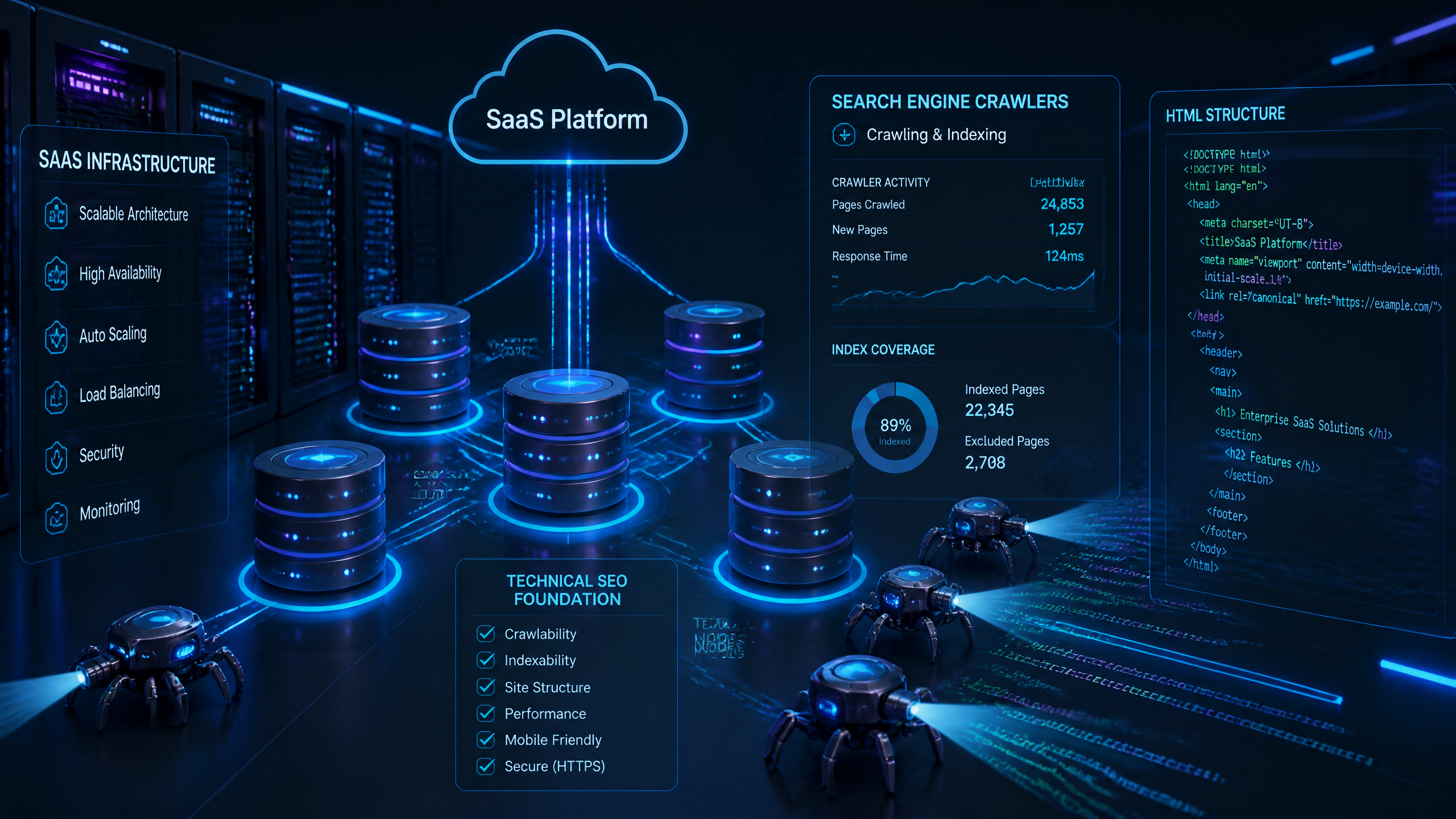
• Infrastructure Over Marketing: SaaS SEO must be treated as a core development requirement, not a simple marketing checklist.
• SSR is Mandatory: Server-Side Rendering (SSR) is critical to ensure search engine crawlers can index dynamic, JavaScript-heavy pages.
• Crawl Budget Protection: Use strict robots.txt configurations and clean subdomain separation to keep the application code out of search engine indexes.
• Dynamic Canonicalization: Prevent index bloat by programmatically managing dynamic and parameterized URLs.
• Continuous Performance Monitoring: Core Web Vitals must be tracked as part of your deployment pipeline to preserve search rankings.
TL;DR
Optimizing technical SEO for SaaS requires shifting from a keyword-only mindset to an "Infrastructure-as-SEO" framework. This guide outlines how to configure Server-Side Rendering, manage complex URL parameters, structure site architecture for scale, and build automated auditing pipelines. By treating technical SEO with the same rigor as product security and performance, SaaS companies can secure sustainable, long-term organic visibility.
Table of Contents
The SaaS Technical SEO Blueprint: Why Infrastructure Trumps Keywords
• The Cost of Neglecting the Technical Foundation
• Treat SEO Like Engineering Infrastructure
• Bridging the Marketer-Developer DivideSolving the JavaScript Rendering Dilemma: Client-Side vs. SSR
• Why Client-Side Rendering Fails Search Bots
• Implementing Server-Side Rendering (SSR) and Dynamic Fallbacks
• Real-World SaaS Rendering ProtocolTaming the Parameterized URL Beast: Canonicalization & Governance
• The Nightmare of Index Bloat and Wasted Crawl Budget
• How to Build a Dynamic Canonicalization Engine
• Configuring Robots.txt to Protect Your Crawl BudgetSite Architecture and URL Hygiene for Rapidly Scaling SaaS
• Designing a Flat Site Structure (≤ 3 Clicks)
• Subdomain Separation: Keeping the App Away from the Marketing Site
• Dynamic XML Sitemaps for Continuous Feature LaunchesOptimizing Core Web Vitals and Page Speed for SaaS Platforms
• Reducing Unused JavaScript and Deferring Non-Essential Scripts
• Content Delivery Networks (CDNs) and Global Caching
• Image Optimization and Safe Lazy LoadingStructured Data and Crawl Health Automation
• Implementing SaaS-Specific Schema Markup
• Automating Technical Audits to Catch Regression
• Redirect Strategies and URL Slug HygieneFrequently Asked Questions
Sources
The SaaS Technical SEO Blueprint: Why Infrastructure Trumps Keywords
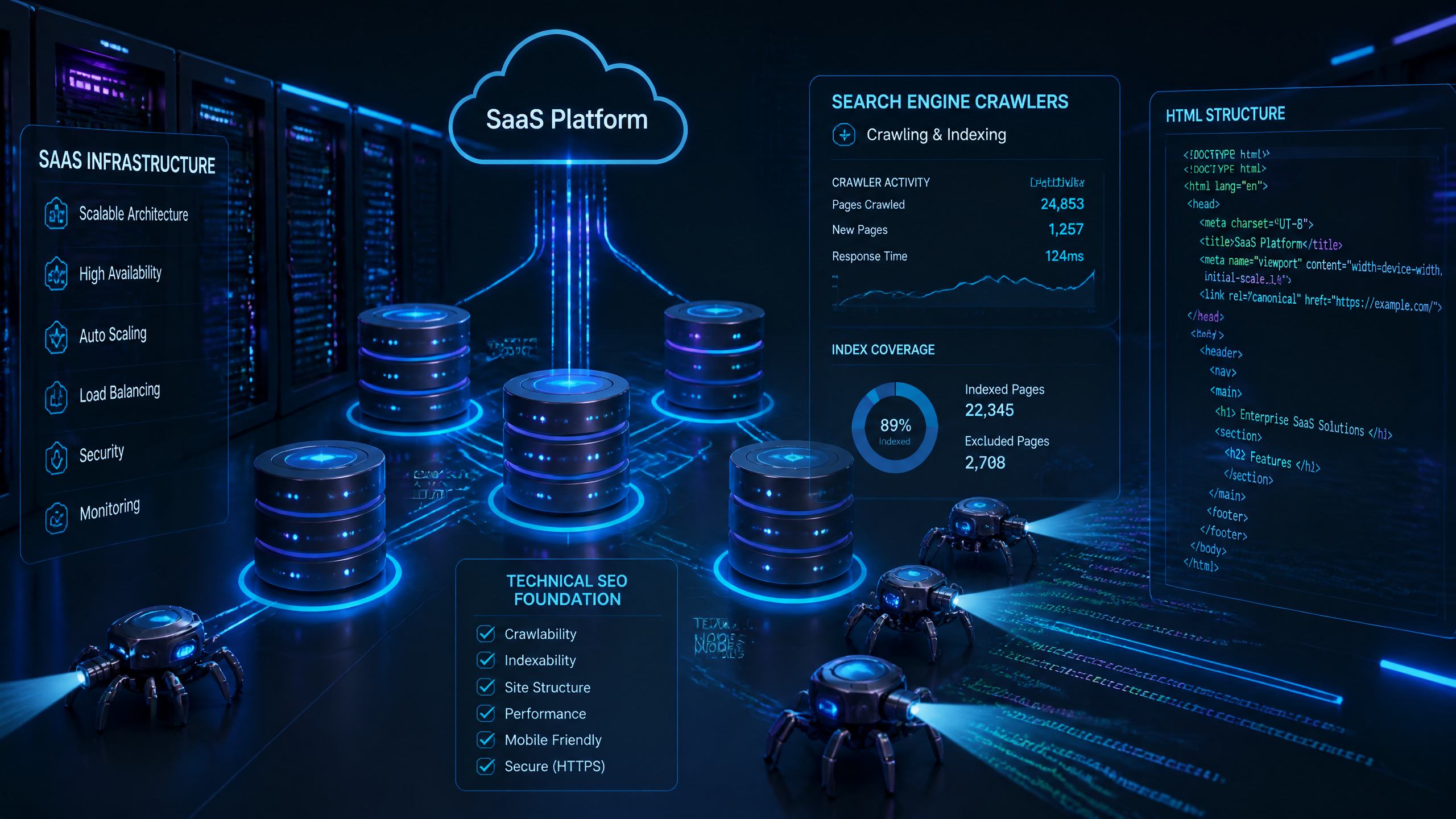
So, here's the thing about SaaS SEO: most marketing teams spend months obsessing over keyword research and churning out blog posts, completely ignoring the silent killer lurking underneath — their platform's technical infrastructure.
I've seen too many teams obsess over keywords and neglect technical foundations like site architecture and mobile responsiveness. You can write the most brilliant, authoritative piece of content in your niche, but if Googlebot gets stuck in a client-side rendering loop or choked by a bloated dynamic URL structure, that content might as well not exist.
The Cost of Neglecting the Technical Foundation
When technical foundations fail, the business consequences are immediate and painful. Index bloat — where search engines index thousands of low-value, duplicate, or internal application pages — dilutes your domain authority and wastes your crawl budget. If Google's crawlers are busy trying to process 10,000 parameterized search filter URLs, they won't have the resources left to find your newly published, high-intent landing pages.
I once made this mistake early in my career. We launched over 1,000 dynamic feature pages for a B2B SaaS platform, thinking we were going to capture massive long-tail search volume. Instead, we triggered a massive duplicate content penalty because we didn't implement self-referential canonical tags. Our organic traffic plummeted by 35% in three weeks. It took us two months of frantic cleanup in Google Search Console (GSC) to recover. Don't let your marketing site become a cautionary tale.
Treat SEO Like Engineering Infrastructure
According to Blue Things’ 2026 checklist, SaaS companies should treat SEO like infrastructure rather than a marketing checkbox to ensure scalable site architecture. This shift in perspective means technical SEO is integrated into your deployment pipeline, security reviews, and system architecture discussions.
When you treat SEO as infrastructure, you build systems that inherently support search visibility. This means implementing automated testing for canonical tags, structural schema, and redirect paths during your continuous integration and continuous deployment (CI/CD) cycles.
Bridging the Marketer-Developer Divide
The misconception that technical SEO is just for developers is frustrating — it’s crucial for marketers to understand the basics too. Marketers don't need to write production-ready React code, but they must understand how rendering choices impact crawlability and indexing. Conversely, developers don't need to know how to write a compelling meta description, but they must understand why injecting dynamic content via client-side API calls can hide critical text from search bots.
Stakeholder | Primary Responsibility | Key Technical SEO Metric | Collaboration Touchpoint |
|---|---|---|---|
Product Engineers | App performance, SSR deployment, API integrity | Time to First Byte (TTFB), JS execution limits | Core Web Vitals optimization |
Growth Marketers | Content strategy, landing page creation, conversion | Indexation rate, organic traffic, CTR | URL slug structure, on-page schema |
SEO Specialists | Technical site health, crawl architecture, indexing | Crawl budget efficiency, GSC coverage errors | CI/CD technical audits |
Solving the JavaScript Rendering Dilemma: Client-Side vs. SSR
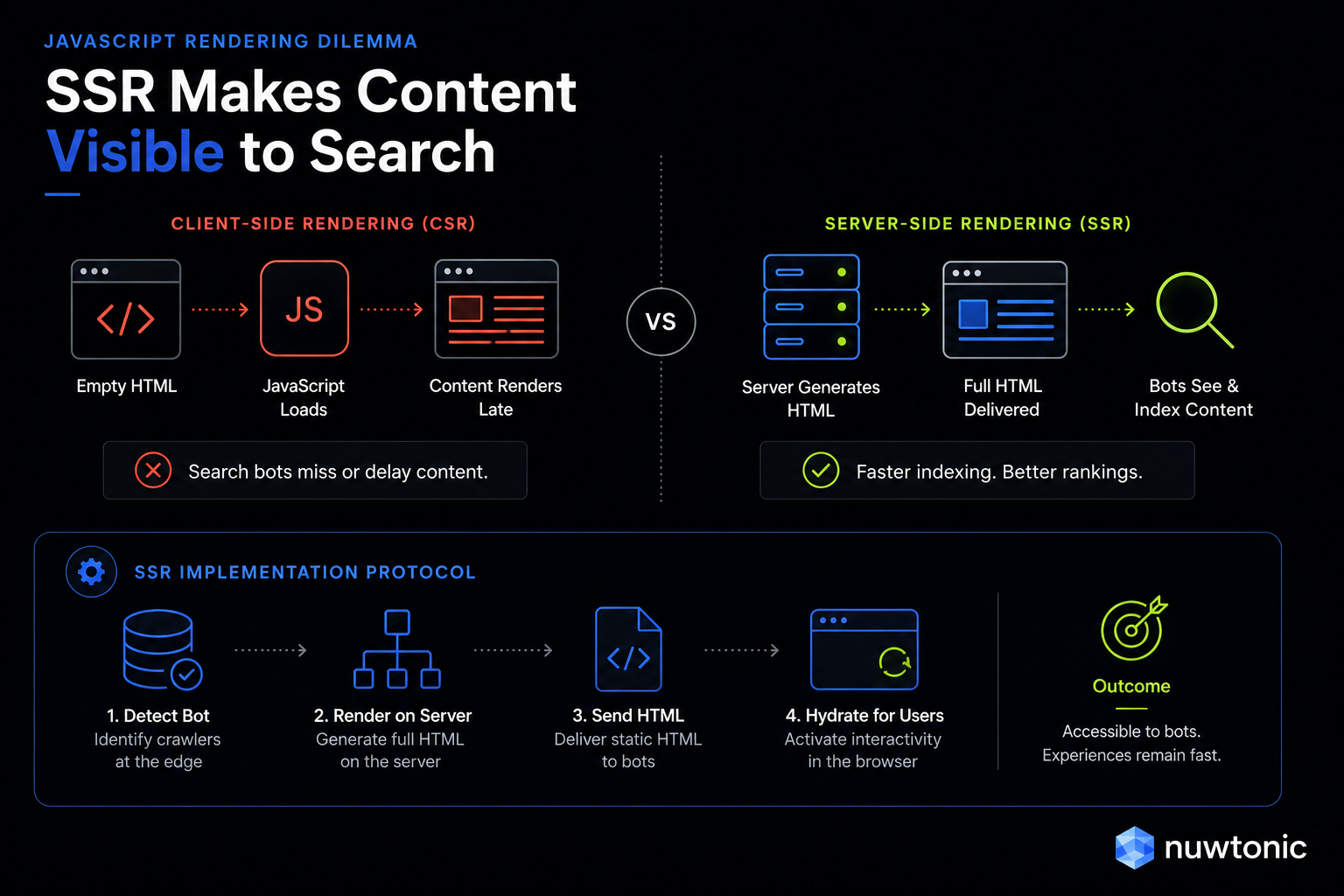
Modern SaaS platforms love JavaScript. Frameworks like React, Angular, and Vue allow developers to build incredibly fast, interactive user interfaces. But there is a massive catch: search engine crawlers do not browse the web like humans do.
Why Client-Side Rendering Fails Search Bots
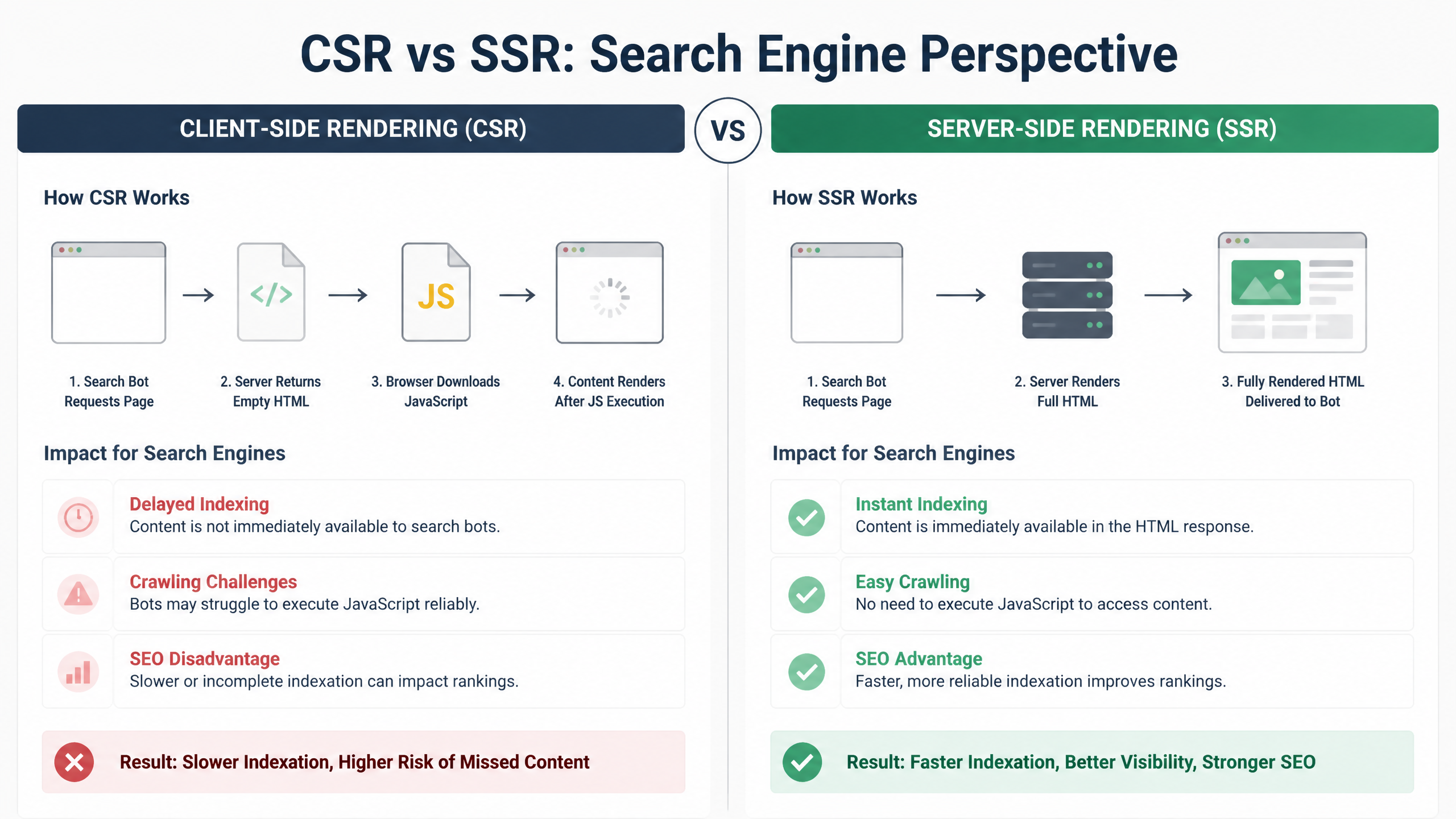
In a Client-Side Rendering (CSR) setup, the server sends a nearly empty HTML shell containing a script tag. The user's browser downloads the JavaScript, executes it, and renders the content.
While Googlebot has become incredibly sophisticated at rendering JavaScript over the years, it operates on a two-wave indexing model. First, it crawls the raw HTML and indexes what it finds. Only when rendering resources become available — which can take days or even weeks — does it execute the JavaScript and index the fully rendered page. If your marketing content lives entirely inside client-side JS, you are essentially hiding your site from search engines during that critical first wave.
Implementing Server-Side Rendering (SSR) and Dynamic Fallbacks
To bypass this rendering bottleneck, SaaS companies must change how they serve pages to search bots. A 2025 guide by Embarque states that SaaS companies must use server-side rendering (SSR) or pre-rendering for dynamic pages to ensure bot visibility. SSR renders the full page on the server and delivers complete, clean HTML to the client.
If full SSR is too resource-intensive for your engineering team to implement across the entire application right away, dynamic rendering serves as an effective fallback. Dynamic rendering detects the user agent. If the visitor is a search bot (like Googlebot or Bingbot), the server routes the request to a pre-renderer (such as Puppeteer or Prerender.io) to deliver flat HTML. If the visitor is a human, they receive the standard client-side experience.
Real-World SaaS Rendering Protocol
To make this actionable, here is the exact protocol I recommend for SaaS development teams. A 2026 Technical SEO Audit Checklist by Analytify found that implementing server-side rendering for all public marketing pages is the most impactful SaaS technical SEO best practice.
Don’t ignore your rendering path — it is the foundation of your entire organic search presence. Use the following framework to decide your rendering strategy:
Public Marketing Pages (Home, Features, Pricing, Integrations): Must use Server-Side Rendering (SSR) or Static Site Generation (SSG). Absolutely no client-side rendering should be tolerated here.
Developer Documentation & API Guides: Use SSG. Documentation changes infrequently but contains valuable long-tail keywords that technical buyers search for.
Interactive App Dashboards (Behind Login): Client-Side Rendering (CSR). Since these pages require authentication, search bots cannot access them anyway, making SSR unnecessary.
Public-Facing User-Generated Content (UGC) / Marketplaces: SSR with aggressive edge caching to handle dynamic data loads without sacrificing speed.
Taming the Parameterized URL Beast: Canonicalization & Governance
SaaS platforms are dynamic by nature. Users filter integrations, toggle pricing tiers, search directories, and share stateful URLs. This flexibility creates a technical nightmare for search engines: an infinite loop of parameterized URLs.
The Nightmare of Index Bloat and Wasted Crawl Budget
Consider a simple integrations directory. Your clean URL is yoursaas.com/integrations. But when a user filters for CRM integrations, the application might generate yoursaas.com/integrations?category=crm&sort=popular&session_id=98765.
If search engines discover and crawl these parameterized URLs, you will quickly suffer from index bloat. This wastes your crawl budget — the limited attention Googlebot allocates to your domain — on thousands of near-duplicate pages.
How to Build a Dynamic Canonicalization Engine
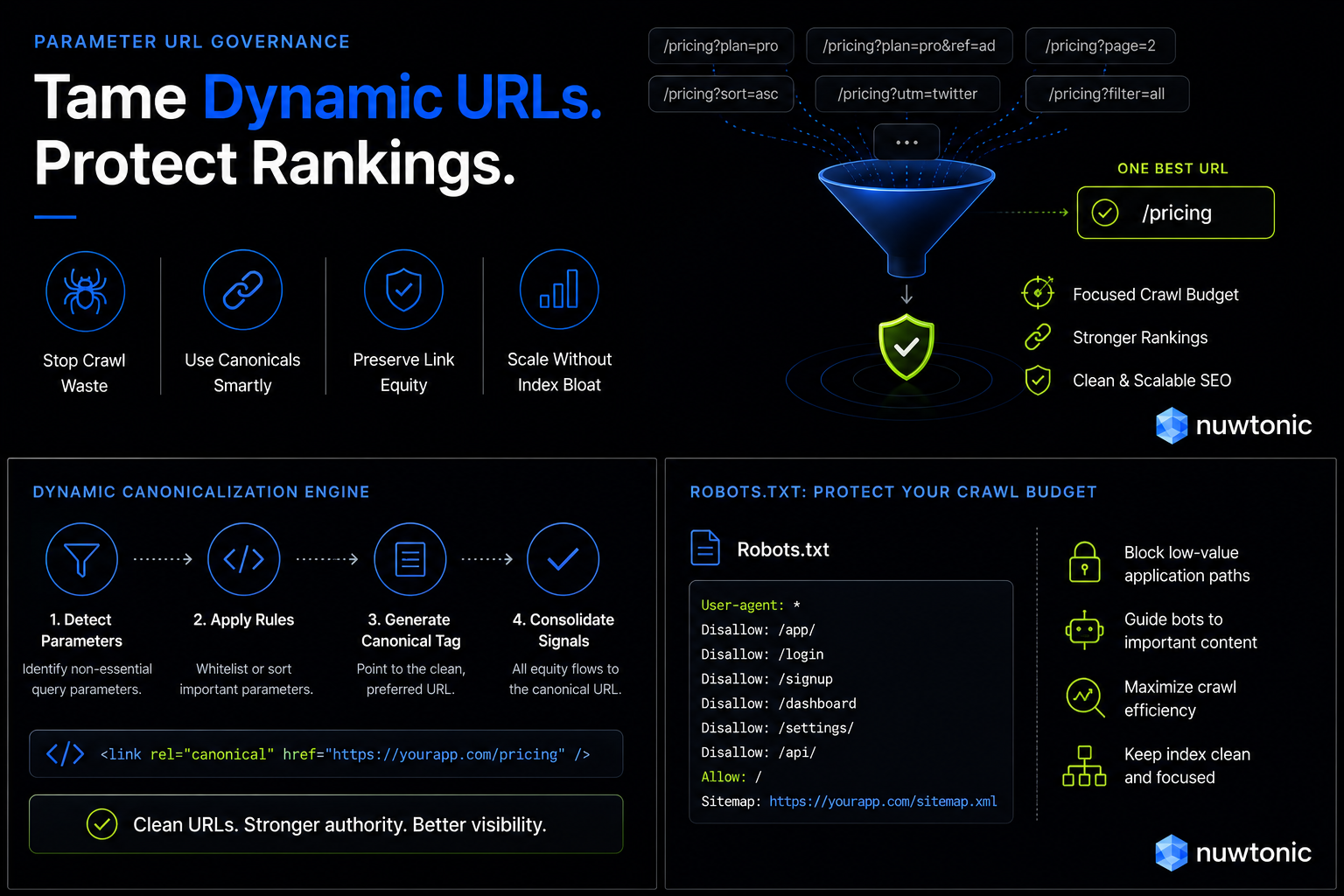
To combat this, you need a programmatic canonicalization strategy. According to Kreativstreet's 2025 Advanced Technical SEO guide, proper canonicalization must be implemented for dynamically generated URLs to prevent duplicate content.
According to the 2026 Analytify checklist, using canonical tags on all parameterized URLs is a top SaaS technical SEO strategy to prevent duplicate content. Your development team must implement a routing rule that automatically strips dynamic parameters (like tracking tokens, session IDs, and active filters) and points the <link rel="canonical" href="..."> tag to the clean, master version of the URL.
For example, if a bot accesses:https://www.yoursaas.com/features/analytics?user_id=123&theme=dark
The canonical tag injected into the HTML head must read:<link rel="canonical" href="https://www.yoursaas.com/features/analytics" />
Configuring Robots.txt to Protect Your Crawl Budget
While canonical tags tell search engines which page to index, they do not stop crawlers from requesting and downloading those parameterized pages in the first place. To truly protect your crawl budget, you must pair canonicalization with strict directives in your robots.txt file.
SaaS platforms must block low-value administrative, login, and cart pages via robots.txt to ensure Googlebot focuses on high-intent marketing content. Here is a standard, battle-tested robots.txt configuration for a typical SaaS architecture:
text
User-agent: *
Disallow: /app/
Disallow: /login/
Disallow: /register/
Disallow: /checkout/
Disallow: /api/
Disallow: /*?gclid=
Disallow: /?utm_
Disallow: /?*session_id=
Sitemap: https://www.yoursaas.com/sitemap.xml
Site Architecture and URL Hygiene for Rapidly Scaling SaaS
Your site architecture is the map search engines use to navigate your content. A chaotic, deeply nested structure signals to crawlers that your content is disorganized and unimportant.
Designing a Flat Site Structure (≤ 3 Clicks)
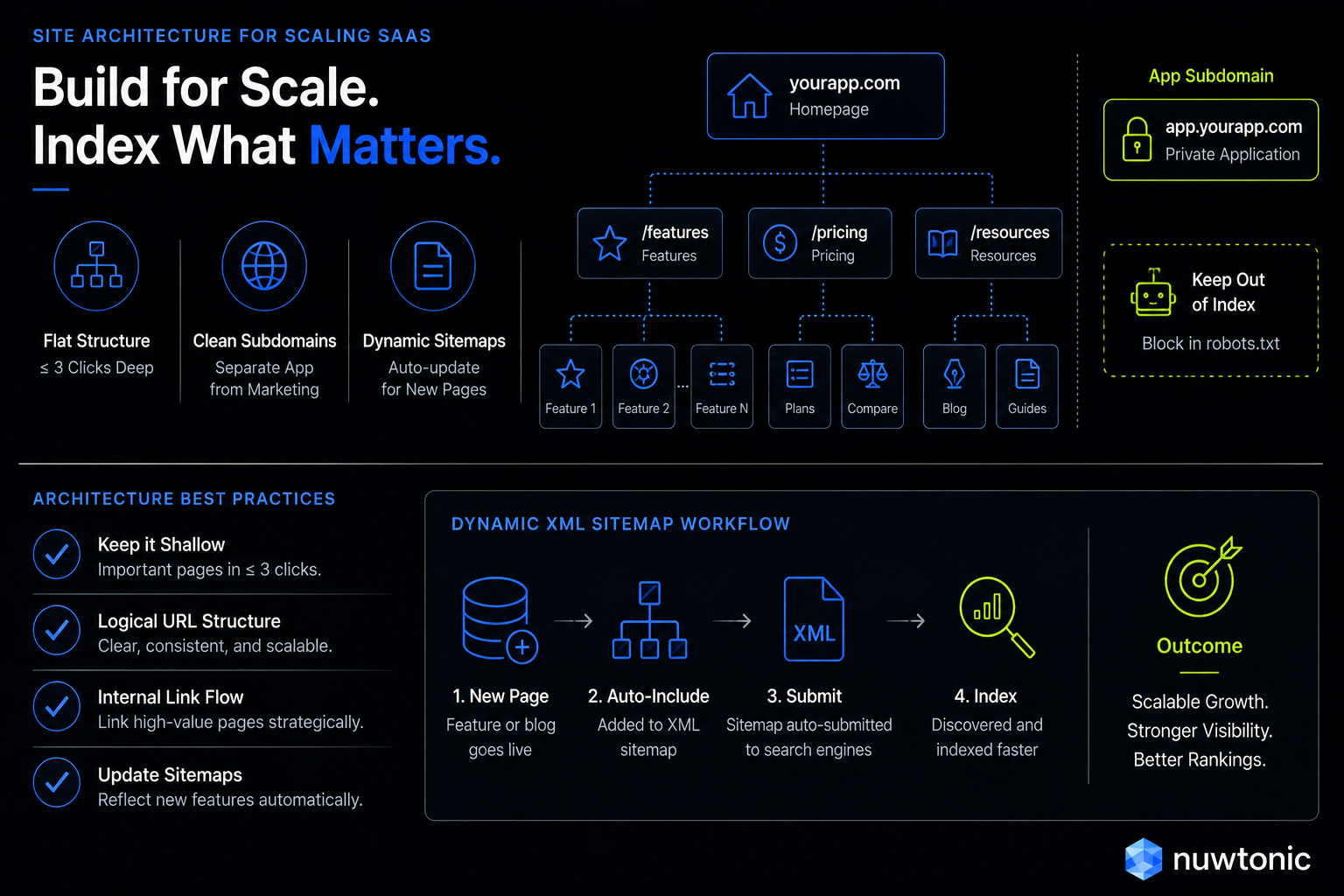
SaaS sites require a flat, logical structure that supports thousands of integration pages, solution pages, and comparison queries without deep nesting. Ideally, any public page on your site should be accessible within three clicks or fewer from the homepage.
Instead of nesting your integration pages deep within subfolders like yoursaas.com/resources/partners/integrations/salesforce, simplify the path to yoursaas.com/integrations/salesforce. This flat architecture distributes link equity (PageRank) more efficiently and signals high topical relevance to search bots.
Subdomain Separation: Keeping the App Away from the Marketing Site
One of the most critical structural decisions a SaaS company must make is where to host the actual software application. A 2025 guide by Embarque highlights the real-world practice of separating app subdomains (e.g., app.yoursaas.com) from marketing content to ensure clearer indexing.
Hosting your application on a subdomain (like app.domain.com) prevents search engines from crawling and indexing secure, dynamic user dashboards. It also keeps your marketing site (www.domain.com) clean and focused on content that drives acquisition.
Architecture Option | Pros | Cons | Best Used For |
|---|---|---|---|
Subdomain Separation ( | Complete isolation of app code; protects crawl budget; simplifies robots.txt management | Split domain authority (though modern search engines handle this better now) | Standard SaaS platforms with complex, gated, JavaScript-heavy application dashboards. |
Subfolder Integration ( | Concentrates all link equity on a single domain | High risk of index bloat; complex routing; difficult to secure application assets | Simple, lightweight SaaS tools or single-page utility applications. |
Separate Domains ( | Maximum security isolation; zero risk of app code impacting marketing SEO | Destroys domain authority consolidation; requires building search authority from scratch | Highly sensitive enterprise software or platforms undergoing major brand transitions. |
Dynamic XML Sitemaps for Continuous Feature Launches
SaaS companies move fast. You might ship five new integrations, three feature updates, and four comparison pages in a single week. Static, manually updated XML sitemaps cannot keep up with this pace.
Don’t ignore your sitemap — it’s vital for GSC. A dynamic XML sitemap, which automatically updates via your CMS or database whenever a new page is published or removed, ensures that search engines discover and index your new integration or feature pages immediately.
Optimizing Core Web Vitals and Page Speed for SaaS Platforms
Many SaaS companies overlook the importance of site speed; optimizing this can lead to faster indexing and better rankings. In fact, page speed is not just a user experience metric — it is a direct ranking factor. A 2025 guide by Nine Peaks states that SaaS sites must have optimal page speed on mobile devices and check server response times to avoid high latency.
Reducing Unused JavaScript and Deferring Non-Essential Scripts
SaaS marketing sites are often plagued by "script creep." Between analytics trackers, heatmaps, live chat widgets, and marketing automation scripts, your site speed can quickly degrade.
According to the 2025 Guide by Kreativstreet, reducing unused JavaScript and deferring non-essential scripts improves Time to Interactive (TTI) for SaaS sites. A 2025 Technical SEO for SaaS guide by Medium states that minimizing JavaScript and using asynchronous loading reduces unused scripts and improves load times.
To fix this:
Use a tag manager to load third-party scripts asynchronously.
Defer non-critical CSS and JS until after the main page content has rendered.
Audit your active scripts quarterly and ruthlessly delete unused tracking codes.
Content Delivery Networks (CDNs) and Global Caching
According to Webflow’s SEO best practices, SaaS sites should improve page loading speeds by using a content delivery network (CDN) and optimizing images. CDNs (like Cloudflare, Fastly, or AWS CloudFront) cache your static assets on servers located physically closer to your global audience, dramatically lowering latency and server response times.
Image Optimization and Safe Lazy Loading
SaaS landing pages love high-resolution product screenshots, complex diagrams, and animated GIFs. If these assets are unoptimized, they will destroy your Largest Contentful Paint (LCP) scores.
Always compress images and convert them to next-generation formats like WebP or AVIF. Implementing lazy loading ensures that images below the fold are only downloaded when the user scrolls to them, saving bandwidth and boosting initial load times.
Warning on Lazy Loading: Do not lazy-load images that appear above the fold (like your hero image). Doing so will delay your LCP and hurt your Core Web Vitals scores.
Structured Data and Crawl Health Automation
To win in modern search, you must make it as easy as possible for search engines to understand the context of your pages and display them prominently in SERP features.
Implementing SaaS-Specific Schema Markup
According to the 2025 guide by Medium, implementing schema markup helps search engines understand SaaS-specific content like pricing and reviews. While there is no official, standalone schema for "SaaS," we can use structured data properties to define our software, pricing, and features.
According to the 2026 Analytify checklist, adding structured data to product, pricing, and FAQ pages is essential for rich snippet eligibility in SaaS. Use SoftwareApplication schema for your core product pages, complete with pricing details (AggregateOffer) and customer reviews (AggregateRating) to earn eye-catching star ratings directly in search results.
{
"@context": "https://schema.org",
"@type": "SoftwareApplication",
"name": "Nuwtonic",
"operatingSystem": "All",
"applicationCategory": "BusinessApplication",
"offers": {
"@type": "AggregateOffer",
"priceCurrency": "USD",
"lowPrice": "49",
"highPrice": "199",
"offerCount": "3"
},
"aggregateRating": {
"@type": "AggregateRating",
"ratingValue": "4.8",
"reviewCount": "142"
}
}
Automating Technical Audits to Catch Regression
A 2026 guide by Blue Things states that automating audits before errors get out of control is essential for maintaining SaaS website health. Because SaaS codebases change rapidly, a single developer push can accidentally delete canonical tags, break redirect rules, or block critical folders in robots.txt.
According to Analytify’s 2026 checklist, monitoring Core Web Vitals continuously, especially after new feature releases, is a critical SaaS SEO strategy. Integrate automated technical SEO auditing tools (like Screaming Frog, ContentKing, or custom script checks) directly into your deployment workflows to catch regressions before they impact live rankings.
Redirect Strategies and URL Slug Hygiene
When modifying your site structure, always use permanent 301 redirects to preserve link equity and authority. Avoid redirect chains (e.g., Page A -> Page B -> Page C) which slow down crawlers and degrade user experience.
Additionally, pay close attention to your URL slugs. A 2026 guide by Marketer Milk states that URL slugs should be modified to be the exact keyword rather than the default title to improve SaaS SEO. Keep your URLs clean, descriptive, and free of unnecessary dynamic parameters.
Frequently Asked Questions
Q: How does Server-Side Rendering (SSR) solve the indexing problem for JavaScript-heavy SaaS landing pages?
• SSR renders your pages into flat HTML on the server before delivering them to search engine bots. This bypasses Google's two-wave indexing model, ensuring your content is immediately visible and indexable without waiting for JavaScript execution resources.
Q: Why should SaaS companies separate their app subdomain from their marketing domain?
• Separating your application (e.g., app.yoursaas.com) from your marketing site (e.g., www.yoursaas.com) isolates secure, user-gated code from search engine crawlers. This prevents index bloat, protects your crawl budget, and simplifies your robots.txt management.
Q: What are the Core Web Vitals targets specifically for SaaS websites to rank well?
• To pass Google's performance thresholds, SaaS sites should target:
Largest Contentful Paint (LCP): Under 2.5 seconds.
Interaction to Next Paint (INP): Under 200 milliseconds.
Cumulative Layout Shift (CLS): Under 0.1.
Q: How can structured data (Schema) be used to highlight SaaS pricing and feature reviews?
• By implementing SoftwareApplication schema combined with AggregateOffer and AggregateRating properties, you can feed structured data directly to search engines. This makes your pages eligible for rich snippets, displaying pricing ranges and review stars directly on the SERP.
Q: What is the best site architecture for a SaaS company with hundreds of integration pages?
• A flat site structure is ideal. Ensure your integration and use-case pages are nested no deeper than one level from the root (e.g., yoursaas.com/integrations/hubspot) and are accessible within three clicks from the homepage.
Sources
SEOmator's 2026 SEO Guide for SaaS [1] [8] [11]
Embarque's 2025 SaaS SEO Rendering & Architecture Guide [2]
Kreativstreet's 2025 Advanced Technical SEO Guide [3]
Analytify's 2026 Technical SEO Audit Checklist [7]
Webflow's SEO Best Practices [5]
Medium's 2025 Technical SEO for SaaS Guide [6]
Blue Things' 2026 Technical SEO Checklist [4]
Nine Peaks' 2025 Guide to Mobile Speed and Latency [10]